.svg)
Pick up a shift your manager has published without rostering anyone on it.
- Open Timble and tap Account at the bottom.
- Under My account, tap Open shifts.
Note: If you can't see this in the app, your business hasn't turned it on for members. Ask your manager.
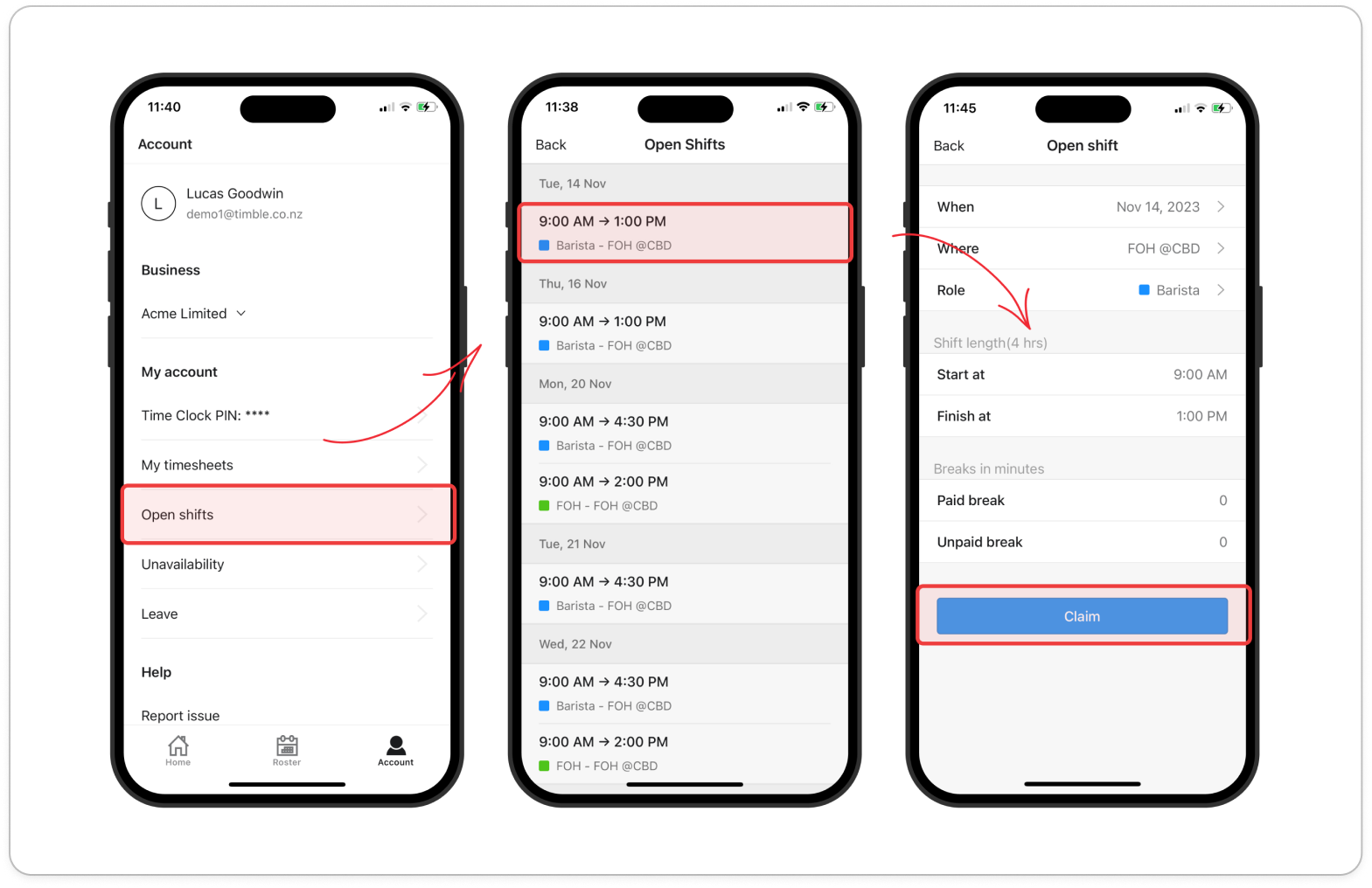
- Tap the shift you want. The Open Shifts list is grouped by day, with Today and Tomorrow labelled, and only shows shifts in your departments that match a role you hold.
Tip: When your manager publishes new open shifts, Timble sends you an Open shifts notification. Tap it to go straight to this list.
- Check When, Where, Role, Shift time, Start at, Finish at, **Paid break and Unpaid break**, plus any note your manager added.
- Tap Claim at the bottom.
- Tap OK on the "You got it!" message.
Note: The shift goes onto the roster against your name as a draft. Once your manager publishes the roster, it shows on Home and the Roster tab like any other shift. If someone else claims it first, Timble says "This open shift is no longer available." Tap OK and pull down to refresh the list.


